
Money2.4.4 - Get APK
You'll be able to download in few seconds.
Publisher Description
#1 Best-selling App on the Amazon Appstore. Read more: ibearsoft.com/blog
Manage your personal finances in the most comprehensive manner with Money for Android devices. Track different accounts (wallets), record your transactions, budget your income and expenses, and keep full control of your personal finances.
Financial Planning in Three Easy Steps
Expense categories expand to fit your needs
Manage all your bills and arrange them via a calendar with bill reminders included in the application, and catch up with any deadline.
Do you have several credit cards, debit cards, and bank accounts plus cash? The Transaction Register is included in the application together with a list of all your accounts. OFX import is supported, so you can import your bank records to the Money app easily and instantly review your accounts, all on the same screen.
Plan all your income and expenses, and check with the available reports to determine whether your plans are accurate. Create reports for each item or category, or check a full report over time.
Elegant Organization
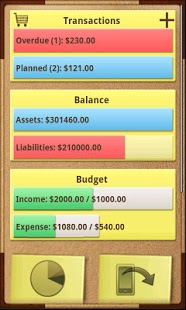
iBear's Money offers 13 expense categories including car, miscellaneous, taxes, entertainment, and more. When you are ready to analyze your assets and liabilities, Money has four main tabs for reporting: Transactions, Balance, Budget, and Reports.
Money uses a beautiful, realistic design reminiscent of a leather organizer, creating a more personal user experience. Everything works as closely as possible to a real-world organizer with paper reports, making your finance management more intuitive and enjoyable.
Important: internet socket permission in Money for Android is used for currency exchange rate update ONLY!
About Money
The company that develops Money is iBear LLC. The latest version released by its developer is 2.4.4.
To install Money on your Android device, just click the green Continue To App button above to start the installation process. The app is listed on our website since 2014-08-28 and was downloaded 0 times. We have already checked if the download link is safe, however for your own protection we recommend that you scan the downloaded app with your antivirus. Your antivirus may detect the Money as malware as malware if the download link to com.ibearsoft.money is broken.
How to install Money on your Android device:
- Click on the Continue To App button on our website. This will redirect you to Google Play.
- Once the Money is shown in the Google Play listing of your Android device, you can start its download and installation. Tap on the Install button located below the search bar and to the right of the app icon.
- A pop-up window with the permissions required by Money will be shown. Click on Accept to continue the process.
- Money will be downloaded onto your device, displaying a progress. Once the download completes, the installation will start and you'll get a notification after the installation is finished.
Program Details
System requirements
Download information
Pricing
Version History
version 2.4.4
posted on 2014-08-28
- compatibility with the iPhone, iPad, Mac versions;
version 1.4.1
posted on 2011-03-17
Several fixes and updates
Disclaimer
External Download
We do not host Money on our servers. We did not scan it for viruses, adware, spyware or other type of malware. This app is hosted by Galad and passed their terms and conditions to be listed there. We recommend caution when installing it.
The APK Download link for Money is provided to you by apps112.com without any warranties, representations or guarantees of any kind, so access it at your own risk.
If you have questions regarding this particular app contact the publisher directly. For questions about the functionalities of apps112.com contact us.
